39
6
Where can I find the blockchain, wallet.dat, etc. on each of the operating systems Bitcoin-Qt supports?
39
6
Where can I find the blockchain, wallet.dat, etc. on each of the operating systems Bitcoin-Qt supports?
47
It is the same data folder as the non-QT version of the standard client used to use:
Linux:
~/.bitcoin/
MacOS:
~/Library/Application Support/Bitcoin/
Windows:
%APPDATA%\Bitcoin
(This defaults to C:\Documents and Settings\YourUserName\Application data\Bitcoin on Windows XP and to C:\Users\YourUserName\Appdata\Roaming\Bitcoin on Windows Vista, 7, 8, and 10.)
On English versions of Windows I presume(?) – Peter Mortensen – 2014-05-16T14:38:55.823
Also have English version and no Bitcoin folder there – Xawery Wiśniowiecki – 2016-03-20T10:19:35.650
1It might be worth noting that it is also possible to specify a custom data directory, using the -datadir=<path-to-folder> option from command line. This actually allows to have multiple running instances of bitcoin: you just need to run bitcoind/bitcoin-qt twice, specifying two different data folders. – FedFranzoni – 2017-10-24T16:36:59.753
6
On the new Mac OS X you can't see the Bitcoin folder in the library under /application support/. You have to use Finder and in the menu look for GO and then GO TO type ~/Library in the box. After that you can see the Bitcoin folder under /application support/.
Or you can hold down the Option key while selecting the Go menu and Library will become an option.
This works as of June 2018 – Bolton Bailey – 2018-06-13T20:22:30.107
2
On windows8, the data folder is here:
C:\Users\ ... your user name ...\AppData\Roaming\Bitcoin\
1So exactly like Windows 7? – Murch – 2015-01-15T08:43:21.307
I also have Windows 7 and no Bitcoin folder there – Xawery Wiśniowiecki – 2016-03-20T10:20:02.463
1
@ThePiachu is right
Linux:
~/.bitcoin/macOS:
~/Library/Application Support/Bitcoin/Windows:
%APPDATA%\Bitcoin
But since there are no instructions, it may be hard for a user to find them, so I'm going to add instructions.
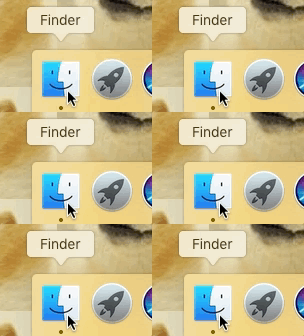
1) Click the Finder symbol
2) Press command (cmd) ⌘ + option (alt) ⌥ + G at the same time.
3) Paste this into the window that opens:
~/Library/Application Support/Bitcoin/
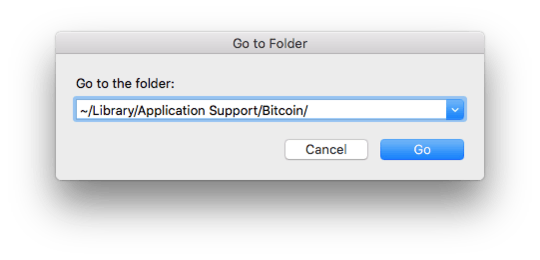
4) Press "Go"
5) That's your Bitcoin folder!
1) Choose one of your folders, and open it (we won't do anything with the folder, so it doesn't matter if it's very important for you).
2) Click the folder icon next to the file location.
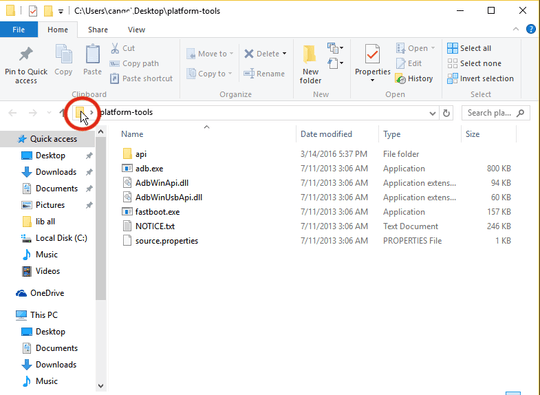
3) Paste the following:
%APPDATA%\Bitcoin
4) Press Enter ⏎
5) That's your Bitcoin folder!





This is not an exact duplicate, but asking about how to change the default storage location has been posted many, many times. The future canonical question is probably Bitcoin-Qt setup: Change block-chain file location, settings? documentation?.
– Peter Mortensen – 2014-08-01T12:37:39.323To be fair I asked this almost a year before that other question was asked. – Chris Moore – 2014-08-01T17:06:31.377
Also the question you linked to doesn't have any information that answers my question. There's no mention on the MacOS path, for instance. – Chris Moore – 2014-08-01T17:10:25.057
I see questions which answer this for particular operating systems, but would like an answer to be able to point to that works for any supported OS. – Chris Moore – 2012-06-20T02:37:12.427
1http://bitcoin.stackexchange.com/q/1350/659 has the OSX path. – Chris Moore – 2012-06-20T02:54:13.607